


Best Free AI Photo Editors Online: What the Free Plans Really Include
The best free AI photo editor online is the one that lets you finish your particular edit and download a usable file without paying. Free access to an editor, free AI credits, and free high-resolution exports are three different benefits. Check all three before choosing a tool.
ImagineLab offers eligible new users 50 EDT after verification without a credit card. Its owner states that these signup credits can access all supported models and available creative features; the public paid-plan cards explicitly advertise all premium image, video and audio models unlocked. Model access still requires enough credits for the chosen job.
Adobe Express and Fotor document ongoing free access. Photoroom also has a Free plan, but restricts free accounts to personal, non-commercial use. Pixlr advertises a time-limited AI trial; that allowance should not be treated as recurring free credits.
This is a documented-plan comparison, checked on 22 November 2026, rather than a hands-on ranking of image quality. Where a provider does not publish a fixed allowance, the table says so rather than assigning an assumed number. ImagineLab is included as a welcome-credit option, with its documented model-access advantage assessed separately from ongoing free allowances. Disclosure: this guide is published by ImagineLab and carries the byline of Sukanta Parthib, its Founder and CEO. It is an affiliated comparison, not an independent endorsement. The documented generation checks below were performed through the connected account; they are not presented as the author’s personal testing.
What “free” actually means
An ongoing free plan can remain available without a subscription, but individual AI tools may consume a limited allowance. A trial unlocks paid features for a stated period. A welcome-credit offer provides a finite starting balance that may never replenish. A free preview can show the result while reserving the useful download for paying customers.
For an occasional social image, a small allowance may be enough. For twenty product photographs, retries, export dimensions and the reset schedule matter much more. An editor that produces a preview but cannot deliver the required file does not complete that job for free.
The current shortlist
| Editor | What the opened pricing page establishes | What still needs checking |
|---|---|---|
| ImagineLab | 50 EDT signup offer after required verification, no credit card; all premium image/video/audio models advertised as unlocked across standard paid tiers | Free-tier all-model access is owner-stated, not exhaustively tested; welcome credits are finite, not a verified recurring allowance |
| Adobe Express | An ongoing Free plan, no credit card required, standard editing tools and limited generative AI credits | Exact free AI allowance for the chosen operation; premium assets; final export restrictions |
| Fotor | Basic is described as free forever, with limited free credits and normal JPG/PNG/PDF exports | Credit amount and renewal; output dimensions. Watermark-Free is not included in the displayed Basic comparison |
| Pixlr | AI generator FAQ advertises 250 credits during a seven-day trial; paid Plus separately lists 80 monthly credits | Trial credits are not an ongoing free allowance; confirm availability and the cost of the specific editing operation |
| Photoroom | Free accounts: 100 monthly exports in its current help table; personal, non-commercial use only | AI allowance is separate; confirm the applicable account limits and export resolution |
The entries are organized by what the public plan information supports, not by a performance score. An unclear allowance is not a claim that a service has no free functionality.
ImagineLab: broad model access with a finite starting balance
EDT stands for Editorialge Digital Token. It is ImagineLab’s internal generation-credit unit: your EDT balance is used to pay for supported creative operations across its Labs. Think of EDT as a shared usage balance, rather than a count of finished images. The amount required depends on the selected model, operation and settings, so one EDT does not necessarily equal one image or one edit.
For example, each of the two image-editing jobs demonstrated below reported a charge of 12 EDT, for a total of 24 EDT. That is the recorded cost of those specific jobs, not a fixed price for every image edit. Check the displayed EDT requirement before submitting a job. The free signup offer provides a starting balance, while paid packages and top-ups provide additional credits under their applicable terms. Model access and the amount of usage you can fund are separate questions.
ImagineLab’s useful distinction is the separation of model choice from credit quantity. ImagineLab’s owner confirms that all supported models and available creative features are unlocked for both free signup users and subsequent paid plans. Access is credit-metered: a user still needs sufficient EDT for the selected operation. For someone comparing creative models, that would let the starting balance fund experiments without first choosing a higher subscription just to unlock a particular model. This is a statement of platform policy supplied for this article, not a completed test of every model on an ordinary free account.
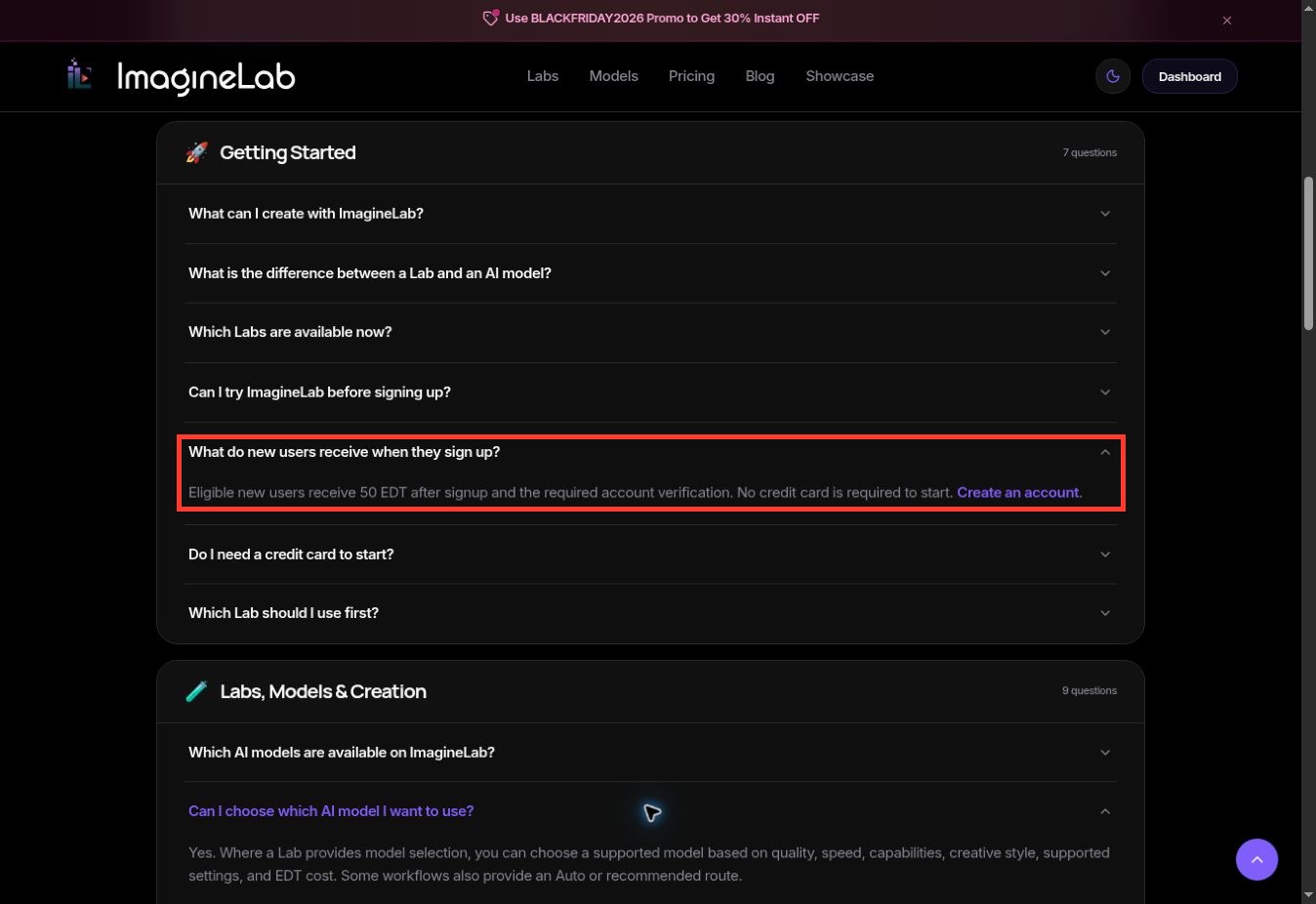
Captured on 22 November 2026. The expanded signup answer confirms 50 EDT and no credit card. It does not specify a recurring free refill or explicitly enumerate free-account model permissions.
What the pricing screenshots establish
The displayed monthly Trial Pack costs $1 for 70 EDT; it is a paid offer, distinct from the free 50-EDT signup balance. Starter lists $10 for 700 EDT and Creator $29 for 2,000 EDT. Each of these cards advertises all premium image, video and audio models unlocked. The higher standard monthly cards repeat that model-access promise.
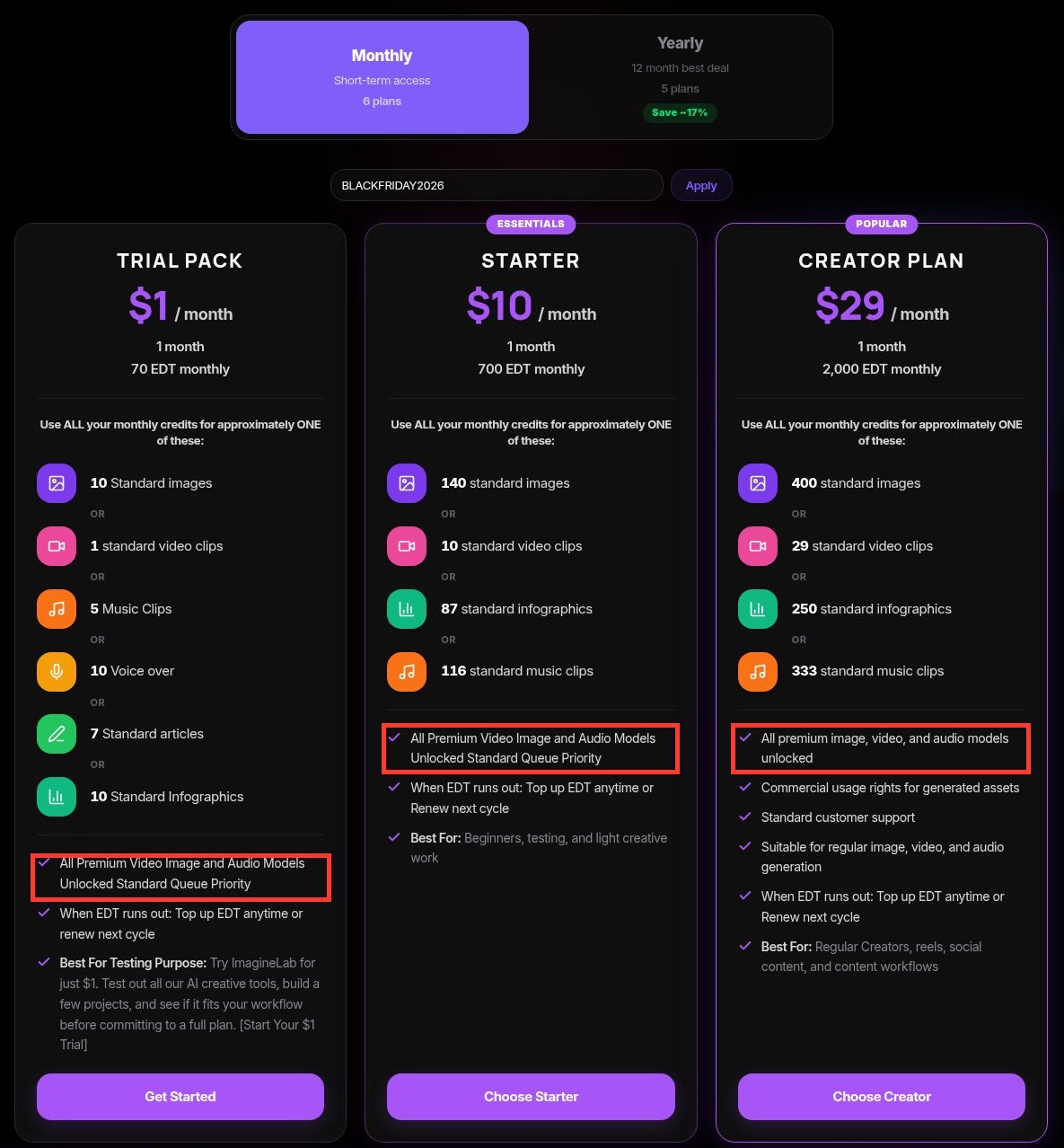
Captured on 22 November 2026 with Monthly selected. The complete Trial Pack, Starter and Creator cards are shown; editorial red boxes highlight the original model-unlock statements. Prices are displayed monthly figures, before any separately eligible promotion. Usage illustrations are alternatives, not additive allowances.
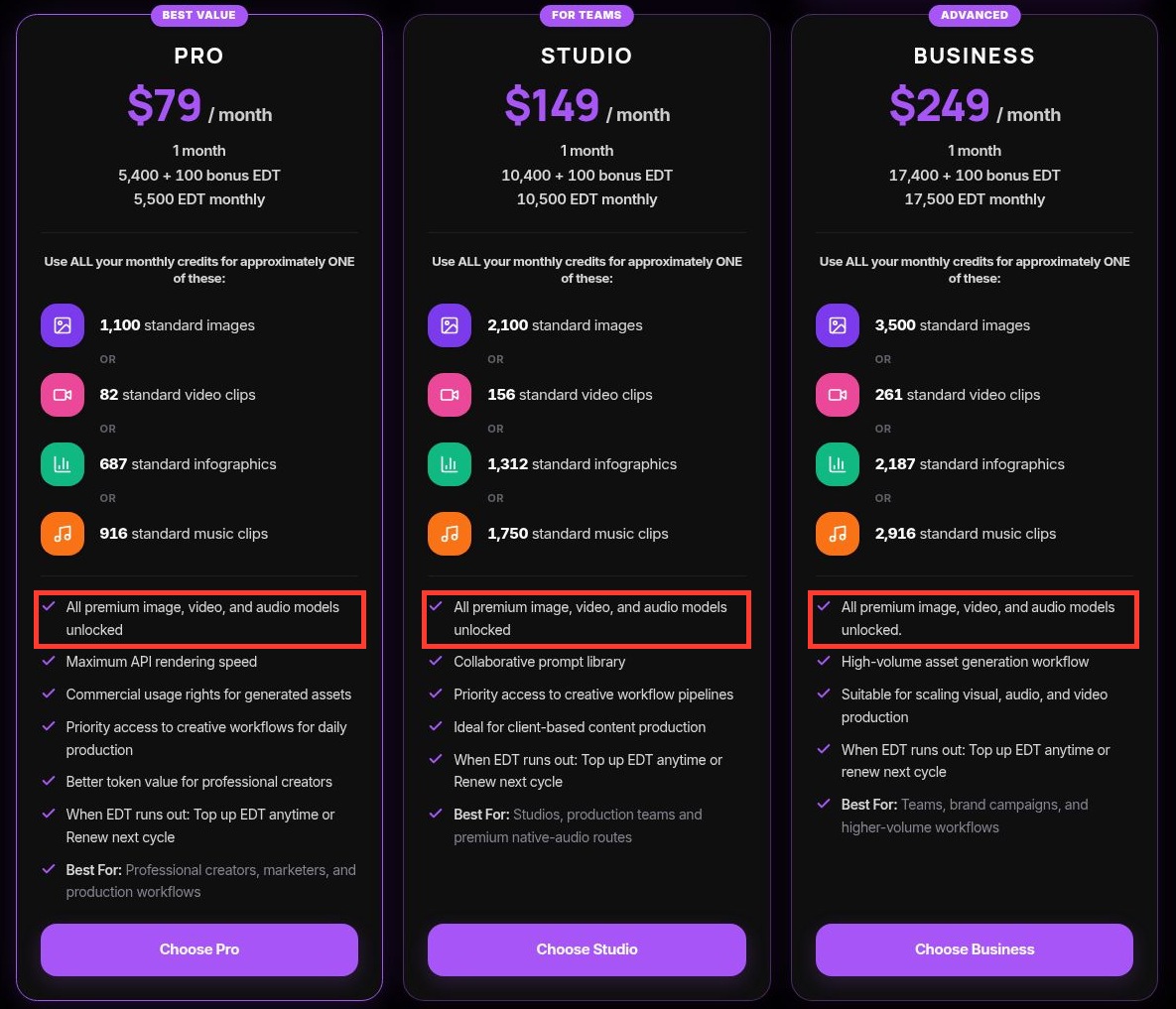
The second row completes the six standard monthly packages. Red boxes mark the same premium-model unlock statement on Pro, Studio and Business. These are annotated real screenshots, not generated interface images.
| Standard monthly package | Displayed monthly price | Included EDT per month | Premium image/video/audio model access shown |
|---|---|---|---|
| Trial Pack | $1 | 70 | Unlocked |
| Starter | $10 | 700 | Unlocked |
| Creator | $29 | 2,000 | Unlocked |
| Pro | $79 | 5,500, including 100 bonus | Unlocked |
| Studio | $149 | 10,500, including 100 bonus | Unlocked |
| Business | $249 | 17,500, including 100 bonus | Unlocked |
Checked on 22 November 2026. The separate custom package is configured for the customer; these standard-card terms should not be assumed to describe every custom agreement.
This is a concrete advantage for model exploration: the entry-level paid card already promises premium model access. More credits buy more capacity; they are not presented on these standard cards as a prerequisite to unlocking the premium image-model catalog.
What the model catalog establishes
The public catalog displayed 44 unique models and an Image category with 12 entries when checked. Its image labels included GPT Image 2.5, GPT Image 2, Nano Banana Pro, Nano Banana 2 and several FLUX and Seedream options. These are ImagineLab’s displayed catalog labels, not independent verification of upstream model versions.
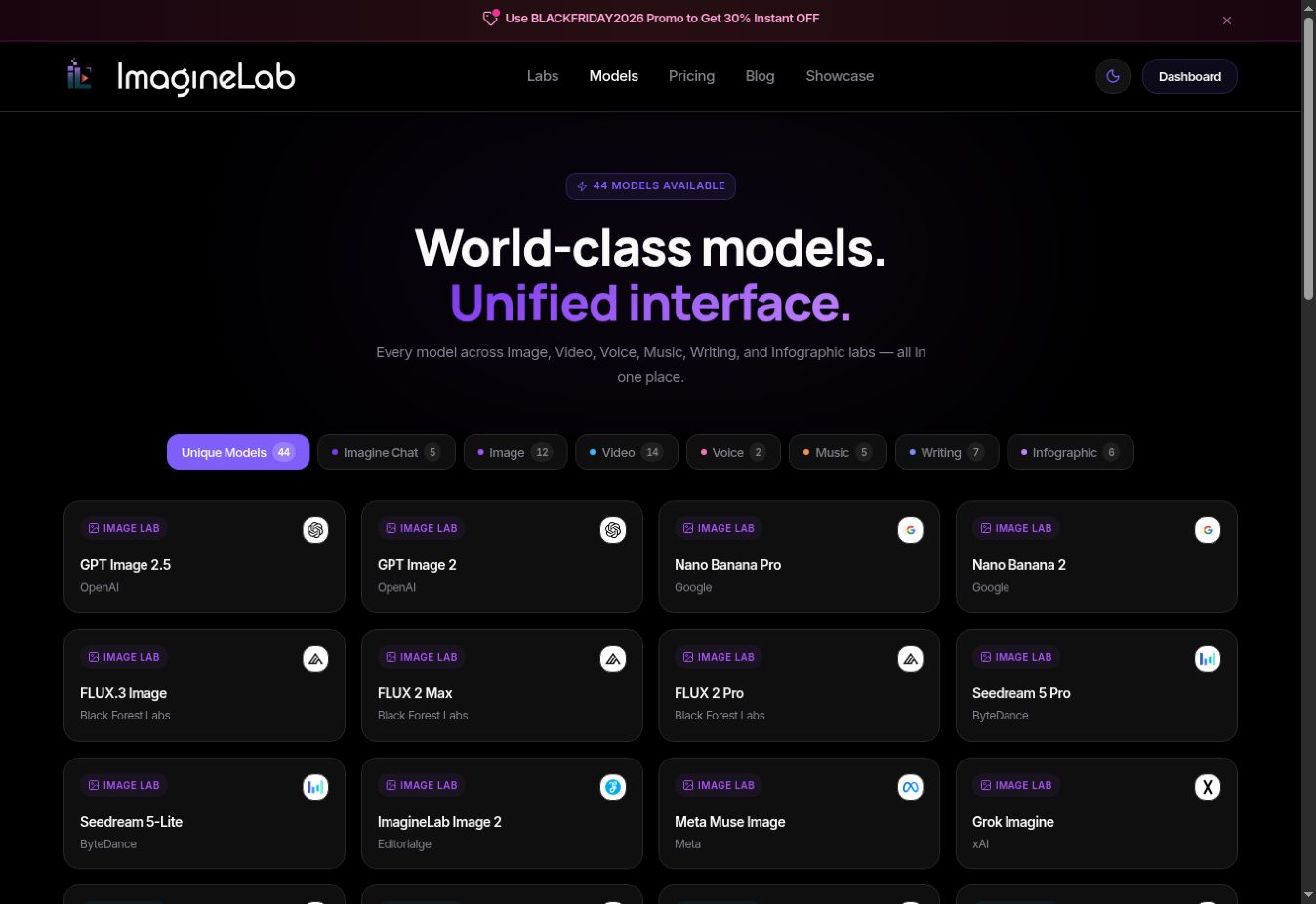
Public model catalog captured on 22 November 2026. A catalog proves what is listed; it does not prove that every listed model was successfully run on a free account.
How that compares with the other four editors
| Service | Meaningful access distinction | Practical limit |
|---|---|---|
| ImagineLab | Owner states all supported models are accessible from free signup credits; standard paid cards explicitly unlock all premium image/video/audio models | Sufficient EDT is still required. Free-account entitlement was not exhaustively tested |
| Adobe Express | Free includes selected AI features; broader model access and larger allowances belong to paid offerings | Daily free generation limits and premium resources still apply |
| Fotor | Basic has limited credits and normal exports | Paid export, transparency and watermark differences can determine whether the file is usable |
| Pixlr | An advertised seven-day AI trial differs from its paid monthly AI allowance | A temporary allowance is not continuing free use; premium access is separately marketed |
| Photoroom | Free offers a limited export allowance for personal work | Free-account commercial-use restriction rules it out for business product listings |
The evidence supports highlighting ImagineLab for breadth of model choice and entry-level paid model access. It does not establish that ImagineLab is the only service worldwide with that approach, or that it delivers the best image quality.
“All models accessible” also needs to stay distinct from “every plan has identical benefits.” ImagineLab’s higher cards advertise priority workflows, collaboration or rendering benefits. Model-specific settings, credit costs and operational availability still differ. Accordingly, this comparison does not promise identical support, queue priority, API access or unlimited generation on every tier.
Adobe Express: start here for a mixed design workflow
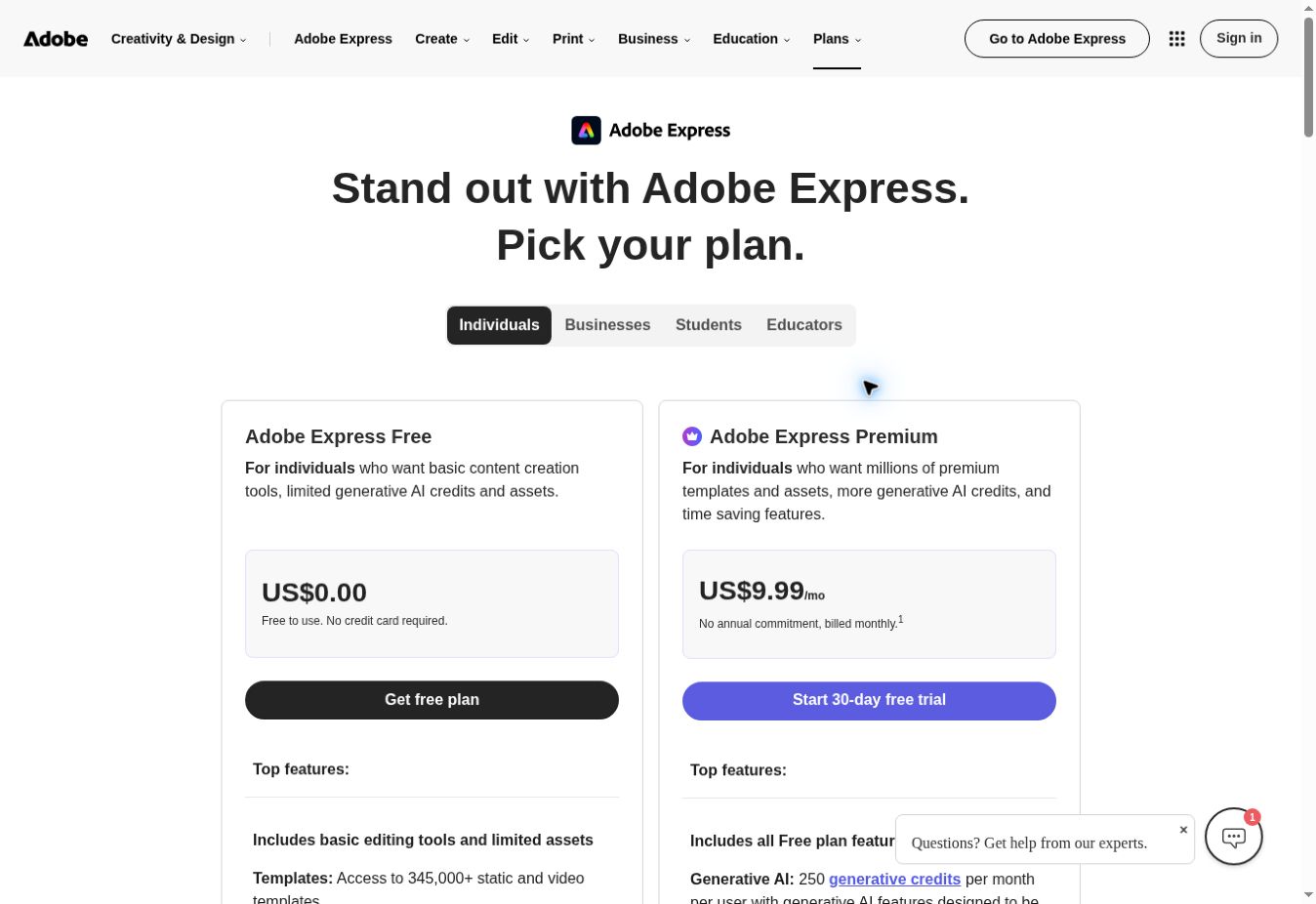
Adobe Express pricing captured on 22 November 2026: the ongoing Free option is separate from the Premium trial.
Adobe Express Free combines standard editing with limited AI access. Its detailed live comparison lists free daily generations for image generation and Insert & Remove Objects, without publishing a fixed count in that table. Its pricing page explicitly says no credit card is required. That makes it a reasonable candidate when the photo will become a social graphic rather than remain a standalone retouched image.
The important boundary is between Free and Premium. Premium’s listed monthly credits must not be copied into a Free-plan comparison. Templates and stock assets can also have different access conditions.
Choose one representative photo, complete the edit using only resources marked available to your account, and reach the download step before building a larger project. The exact free AI quota and chosen export need checking inside that account. This guide does not promise unlimited generation or unrestricted premium assets.
Fotor: check the download tier as carefully as the editing tools
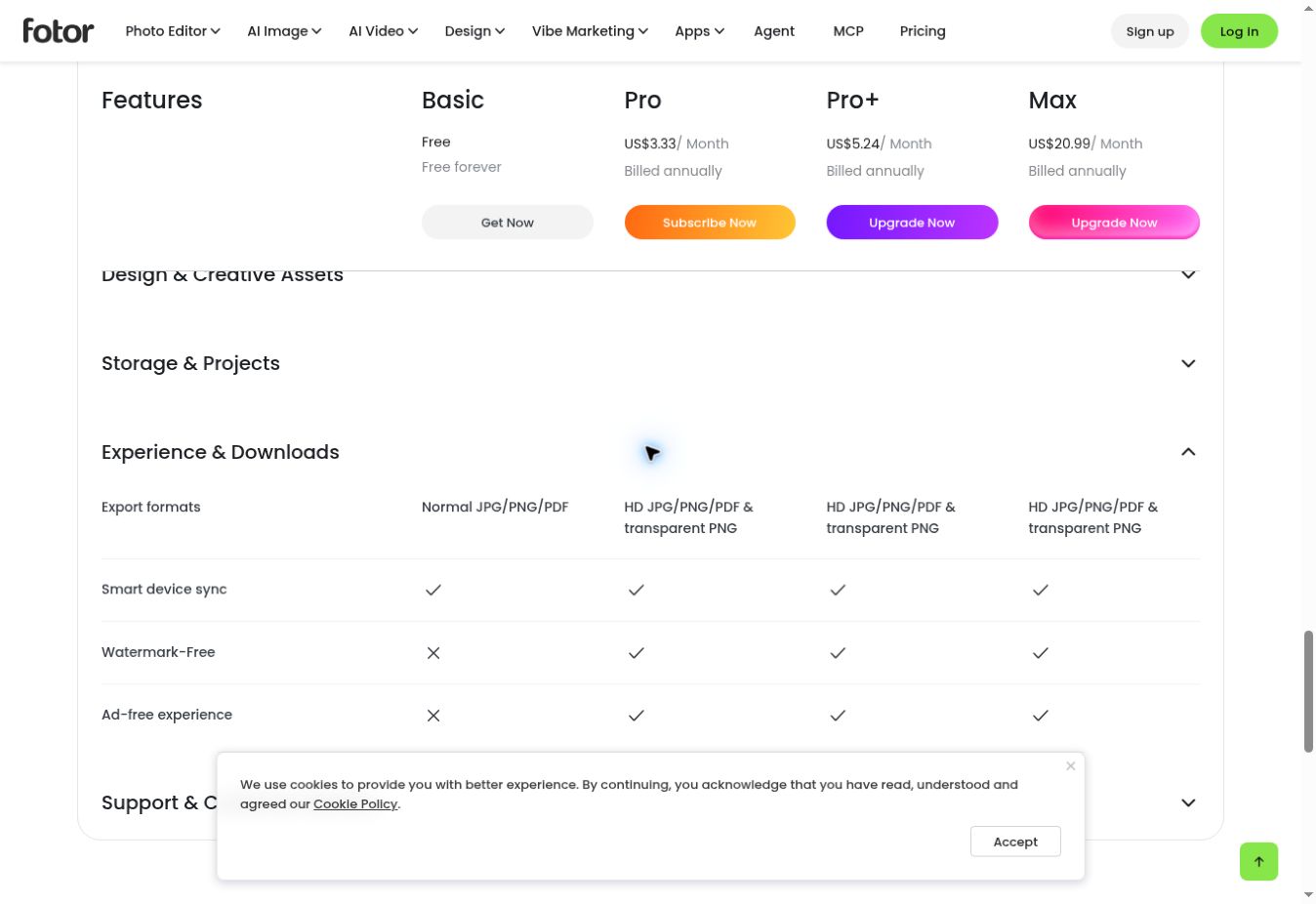
Fotor pricing captured on 22 November 2026: Basic lists normal exports; Watermark-Free has a cross in the Basic column.
Fotor’s Basic plan is labeled free forever and includes limited free credits. The comparison distinguishes normal JPG, PNG and PDF exports from paid HD exports and transparent PNG.
That distinction matters if you need a cutout for a product listing. A standard PNG filename alone does not establish that the background is transparent or that the resolution suits your destination.
Fotor is a candidate for occasional edits and ordinary downloads. Before committing, inspect the credit deduction for your chosen AI operation and download a sample. The pricing text does not establish a stable numerical free-credit allowance, and the live comparison shows a cross for Watermark-Free on Basic. Do not assume Basic includes watermark-free downloads.
Pixlr: separate the free editor from a paid AI allowance
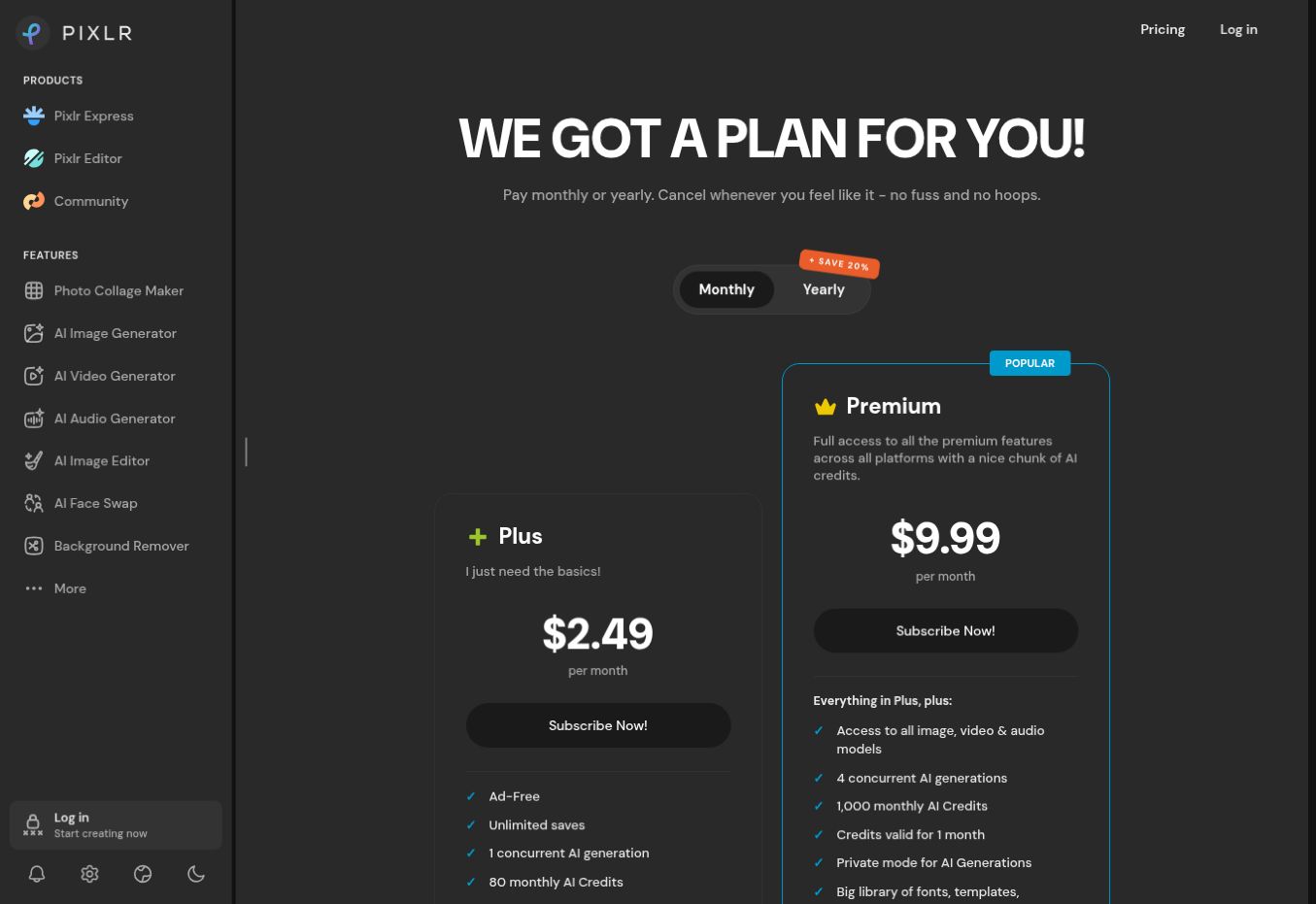
Pixlr pricing captured on 22 November 2026: 80 monthly AI credits belong to paid Plus, not an established free allowance.
Pixlr’s current pricing page lists Plus with unlimited saves and 80 monthly AI credits on monthly billing. These are paid-plan features. They do not prove that a free account receives the same allowance.
This is a common comparison error: a page describes an editor as accessible online, while the AI feature or export entitlement comes from another plan. A credit also need not equal one edit; different operations or quality settings can consume different amounts.
Pixlr’s AI-generator FAQ advertises 250 credits during a seven-day free trial. That is a documented trial offer, not a monthly free-plan quota, and it does not establish that every editing tool is included. Confirm the offer shown in your account before starting a batch.
Photoroom: useful for personal work, restricted for business
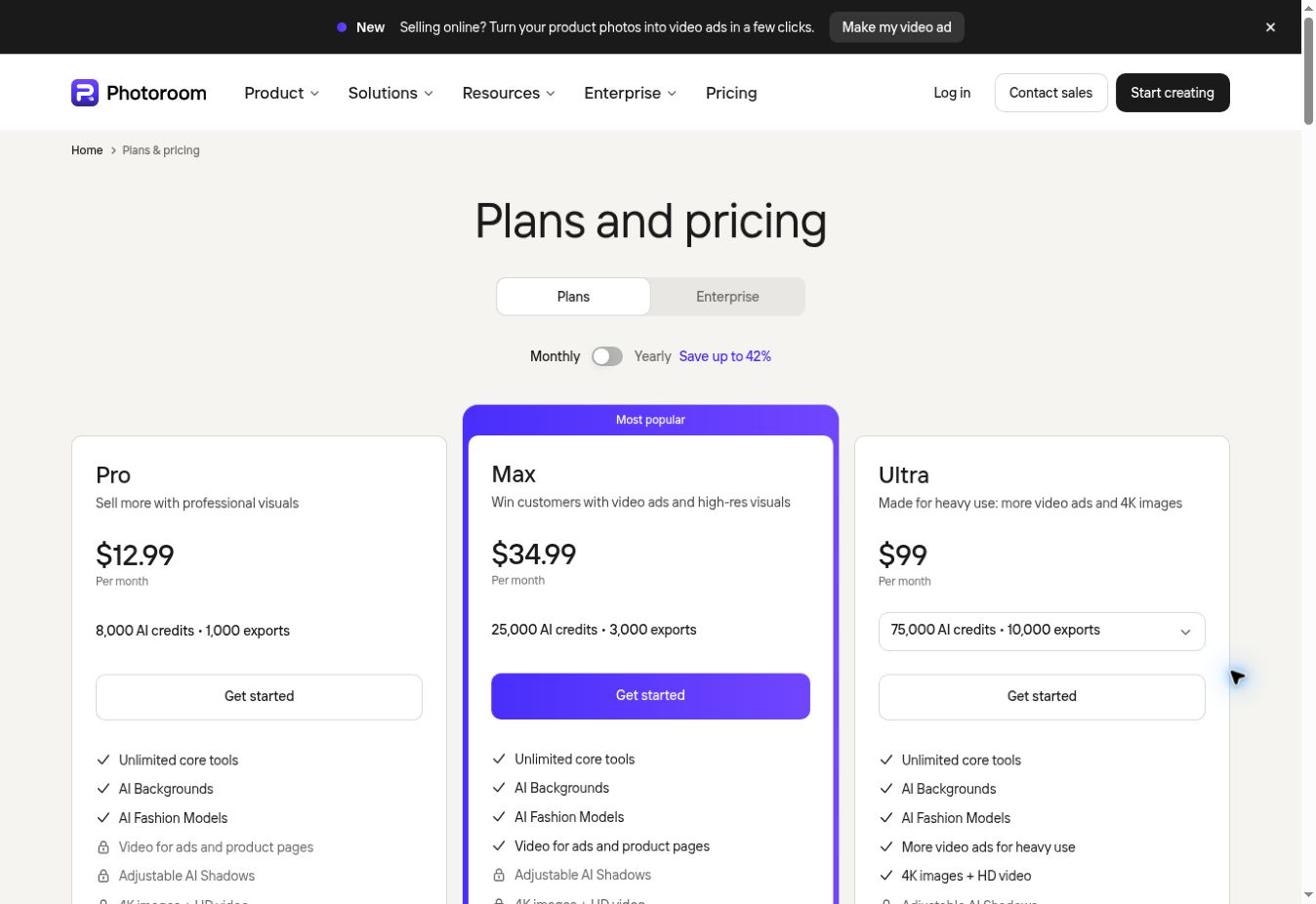
Photoroom pricing captured on 22 November 2026 after switching to Monthly and dismissing the cookie overlay. This browser displayed USD pricing for Bangladesh: Pro $12.99, Max $34.99 and Ultra $99 per month. These are paid packages, not Free-plan allowances; prices can vary by region and billing choice.
Photoroom’s help centre confirms an ongoing Free Space. Its current export table lists 100 exports per month for Free, alongside a weekly column of 25. The reset explanation says free accounts renew monthly from the account creation date; check the counter in your Space for the allowance applied to you.
Exports and AI credits are separate: generating a result consumes the relevant AI allowance, while downloading it counts as an export. A generous export count does not mean an equal number of AI generations.
The decisive restriction for sellers is commercial use. Photoroom explicitly limits free accounts to personal, non-commercial purposes. It therefore does not qualify as a free solution for commercial product listings or advertising. Consider it for personal experiments; evaluate a suitable paid plan for business work.
Five checks that prevent a wasted editing session
- Open the exact AI tool you intend to use. Access to cropping does not prove access to generative replacement.
- Record the available credits and reset language. Distinguish daily or monthly renewals from a one-time welcome balance.
- Complete one representative edit. A simple object with clean edges may not reveal the problems in hair, glass or small packaging text.
- Download and inspect the file. Check pixel dimensions, visible watermarks, transparency, compression and altered details.
- Confirm the terms for the intended use. Subscription price, downloadable output and commercial permissions are separate questions.
Commercial permissions depend on the asset and workflow. Photoroom excludes commercial use on free accounts. Fotor’s help centre restricts free design materials to personal use, while separately allowing personal and commercial use of AI-generator images, subject to its terms and responsibility for the output. That AI-generator statement should not be generalized to every template or stock element. Pixlr’s AI-generator FAQ allows commercial use subject to its terms. Adobe’s live feature comparison marks commercial use for Firefly-powered features, which does not remove separate rights obligations for uploaded or stock material.
A documented ImagineLab editing demonstration
Two reference-image edits were run through ImagineLab’s MCP connection on 22 November 2026 using its model labeled GPT Image 2.5, at 1:1 and 1K. Both used the same synthetic source below and selected its left-hand bottle. This was a credit-charged demonstration on the connected admin account, not a test of the competitors’ free plans or a photographed commercial product.
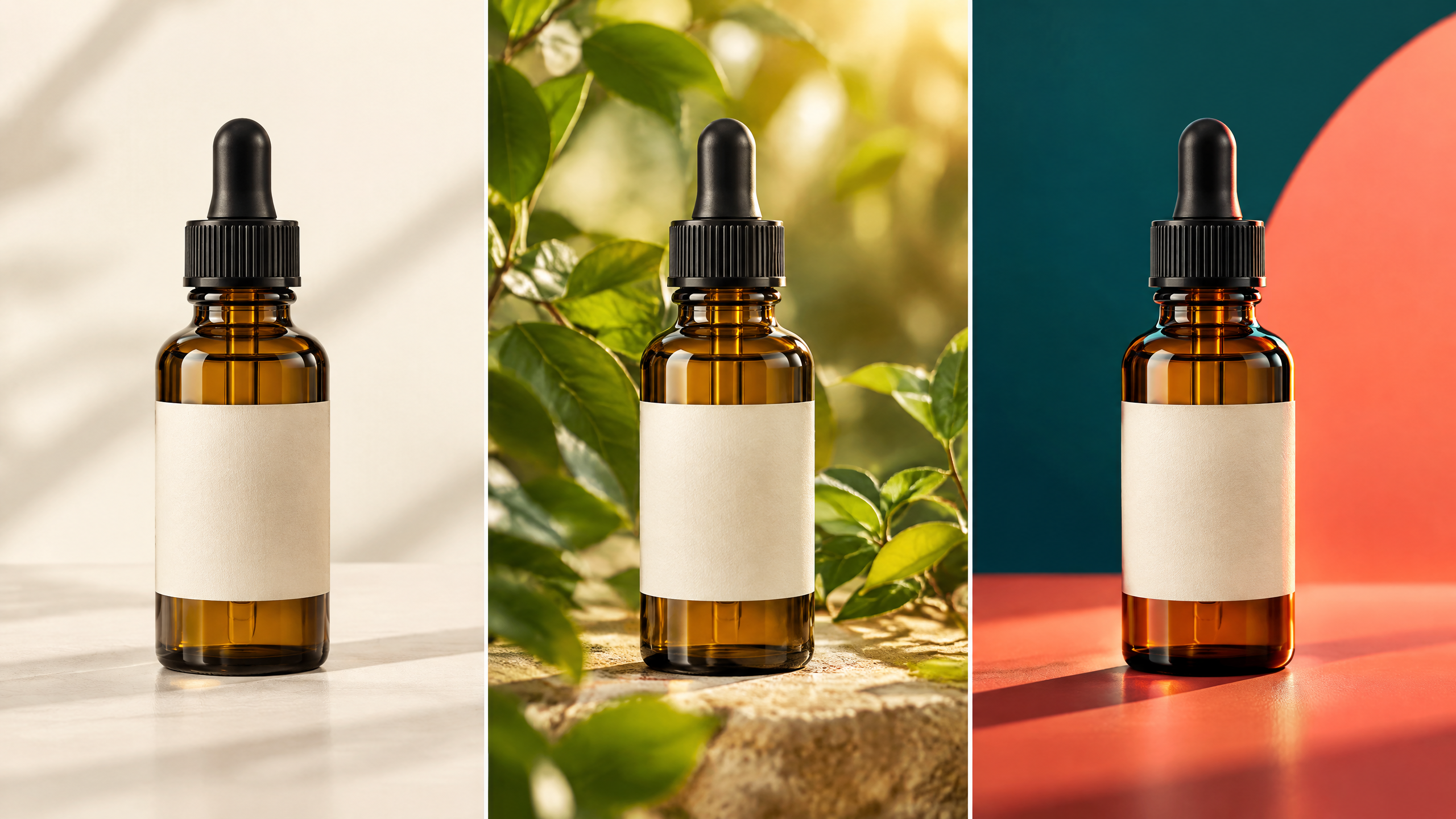
Source: an ImagineLab-generated concept image. Both edits referenced this same file.
The instruction was to isolate the left bottle, preserve its glass colour, cap, label and proportions, and replace the scene with a plain studio background. One attempt requested white; the other requested pale blue. There was one attempt per background, with no retries.
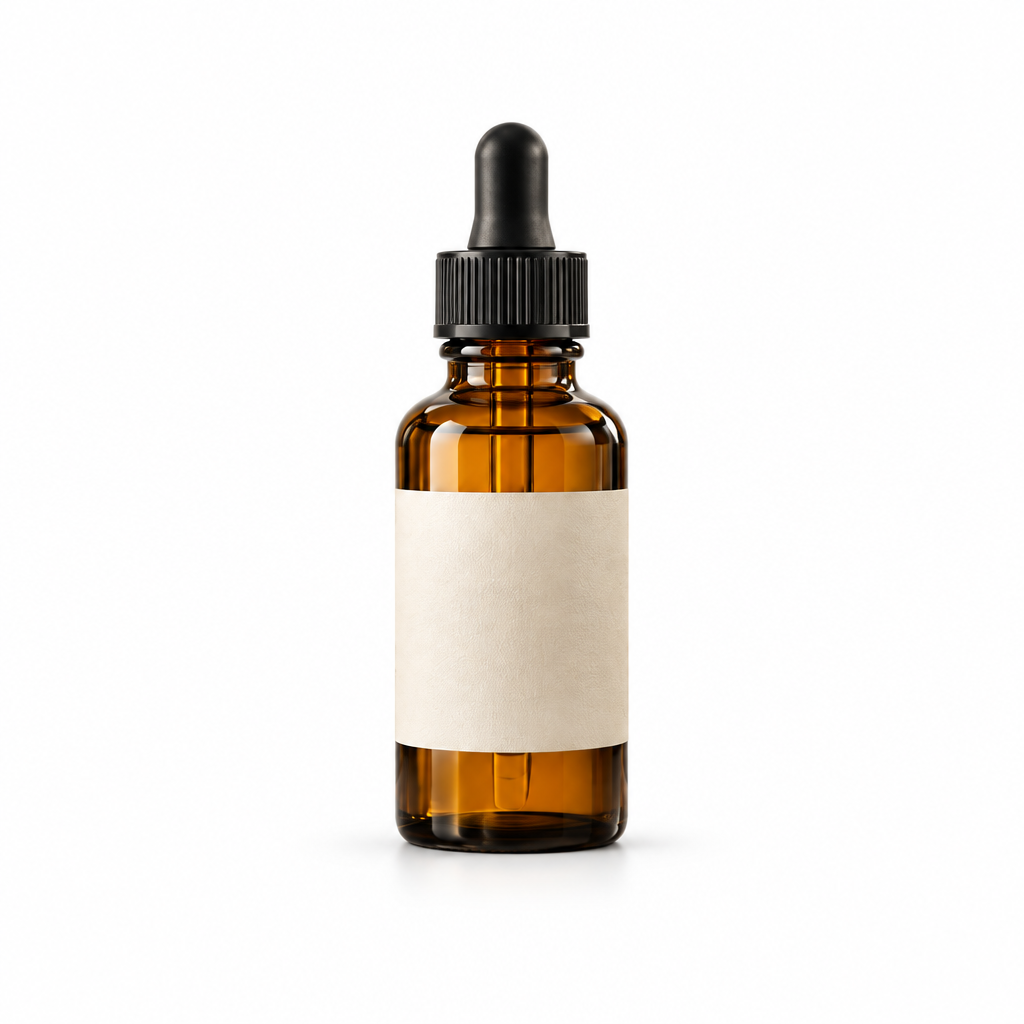
White-background output: 1024 × 1024 pixels. The job reported a charge of 12 EDT.
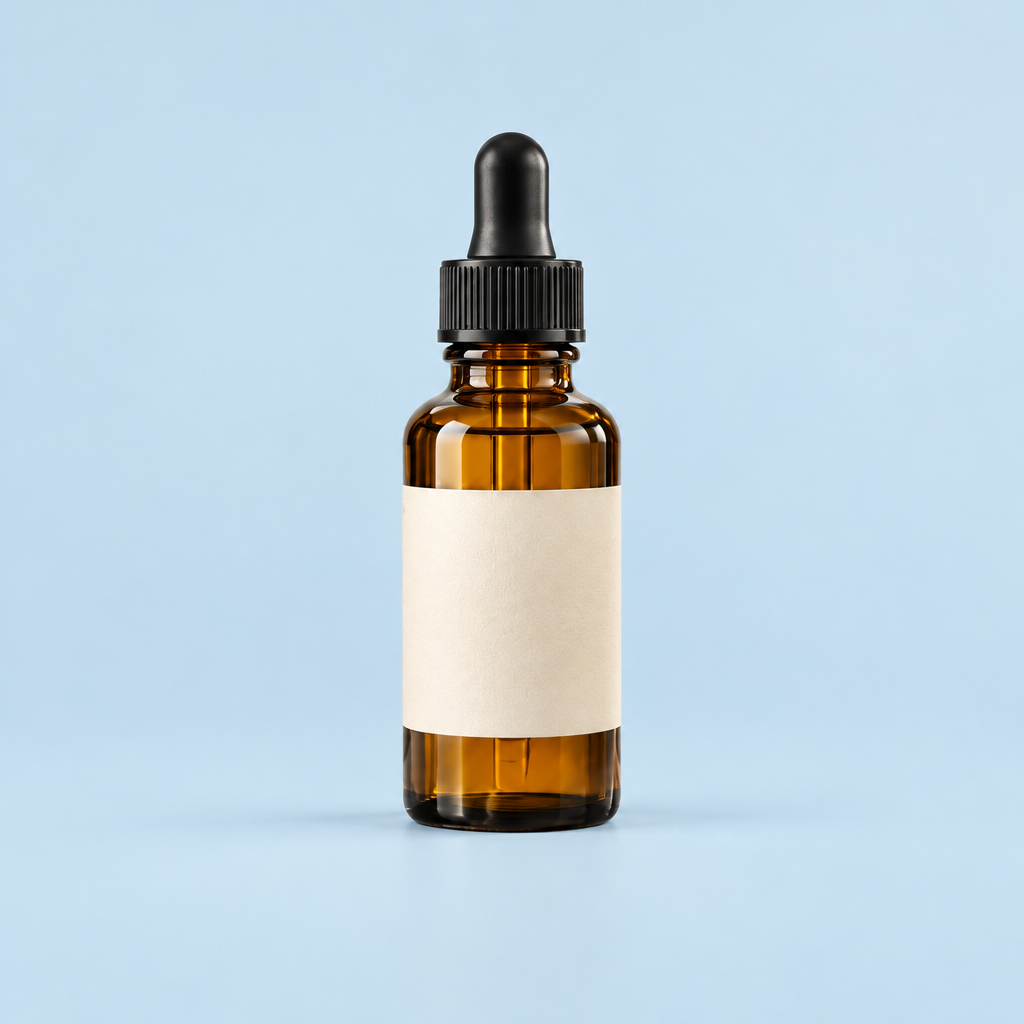
Pale-blue output: 1024 × 1024 pixels. The job reported a charge of 12 EDT.
Both outputs produced the requested single-bottle composition and background colours. Their bottle scale, reflections and label appearance differ, so these examples do not establish exact product preservation. The blank source label also means this demonstration cannot test lettering or logo accuracy. A white background is not transparent.
The two completed edit jobs reported 24 EDT in total. That excludes the previously generated source and article cover. No dollar conversion or free-plan allowance is inferred. The practical lesson is to inspect the actual download and protected product details rather than accepting a polished preview as sufficient.
Estimate usable outputs, not just credits
Suppose a hypothetical plan gives 20 credits and each attempt costs two. Ten attempts are possible, but that does not mean ten acceptable images. If two attempts are needed for each accepted result, the allowance supports five usable results under those assumptions.
This is an arithmetic example, not a quota or performance claim about any editor above. Your actual result depends on the operation, failed attempts, retries and acceptance standard.
For product imagery, inspect the silhouette, colour, label and material before accepting a result. A cleaner background cannot compensate for a changed logo. Our image-editing prompt guide explains how to specify what must stay unchanged.
Choose according to the file you need
For a design that combines an edited photograph and layout, Adobe Express is a sensible first candidate based on its documented Free offering. Fotor is worth evaluating for occasional edits when a normal download is sufficient. Pixlr’s advertised AI trial is best treated as a short evaluation period. Photoroom Free is suitable only for personal, non-commercial work under its documented restrictions.
If you need regular high-resolution cutouts, batch exports or many generative retries, compare the cost of finishing the job rather than the number of features advertised. Our broader photo-editing software guide covers the wider choice.
For comparing models within a single creative workspace, ImagineLab’s Labs are a relevant starting point. Eligible verified signups receive 50 EDT; check each operation’s displayed cost before generating. The documented advantage is broad model choice, while the free balance remains finite and its all-model entitlement is the owner’s stated policy rather than an exhaustive free-account test.
The practical decision is made at export: can the free account deliver an accurate image, in the required format and size, under terms suitable for your use? Confirm that once with your own representative file before investing time in a larger project.