


AI Lifestyle Product Photography Without Changing the Product
AI lifestyle product photography can change the setting around a product, but a reference photo and a preservation prompt do not guarantee that the product itself stays unchanged. If exact SKU accuracy matters, keep the photographed product on a protected layer, build the scene around it, and inspect the final export against the original.
A lifestyle image should help someone imagine where a product belongs. It should not quietly give a mug a different handle, improve a fabric’s texture, replace a label, or add an accessory that the customer will not receive.
This guide explains how to plan that work and decide when a generative edit is acceptable. The three-scene demonstration below uses one real photograph of a heart-patterned travel mug. All three generated scenes remain recognizable, but visible details change. The example shows why a scene can look convincing without meeting an exact-product standard. ImagineLab publishes this guide and owns the platform discussed.
The cover is a conceptual illustration generated with ImagineLab; it is not a photograph from the product test.
What “without changing the product” should mean
There are two different standards behind this phrase.
Visual consistency means the output appears to depict the same item. Its outline, colors, markings and proportions look right after inspection. That can be enough for an exploratory concept, but it is weaker than retaining the photographed object itself.
Pixel preservation means keeping the source product image rather than asking a generator to redraw it. A separate product layer provides control over that boundary. Resizing, masking, color adjustments and export compression can still alter pixels or appearance, so even a composite needs review. “Protected layer” describes a production method, not an automatic certification of accuracy.
Agree on the standard before making scenes. For a store’s specific SKU, visible text, shape, included parts and material should be treated as protected product information. Mood, background furniture and empty space can usually vary more freely.
Why reference-guided generation can change details
A reference image gives a model visual guidance. It does not necessarily turn the product into an immutable object. A request for a different viewpoint, stronger light or a hand holding the item can require the system to generate surfaces that the source photograph never showed.
Reference-image documentation also distinguishes different operations. Adobe’s current Photoshop instructions, for example, distinguish referencing an object from referencing a whole scene, and placing an object from swapping a selected area. Those choices guide generation; they should not be read as a promise that every source detail survives.
The broader reliability issue is covered in NIST’s generative AI risk profile: generated content can diverge from its inputs. For product work, the useful response is a concrete inspection procedure, rather than an assumption that a convincing image is faithful.
A scene can pass an aesthetic review while failing a product review. Keep those decisions separate.
Choose the route before writing a prompt
| Route | What happens to the product | Useful when | Main tradeoff |
|---|---|---|---|
| Reference-guided full-image edit | The model may regenerate product details along with the setting | Exploring compositions and testing whether an output can meet the brief | Every visible product detail needs comparison |
| Background generation plus a separate photographed product layer | The original product cutout is placed over a generated scene | The product must retain its photographed design and markings | Perspective, masking and contact shadows need careful compositing |
| A new physical photograph | The actual product is photographed in the intended arrangement | A new angle, hand interaction or difficult reflection is essential | Requires a suitable location, setup and photography time |
The second route is often the more controllable starting point for a fixed catalog view. It is a general compositing recommendation, not a claim that ImagineLab currently exposes a protected product-layer control.
If the new scene needs to show the back of a bottle and the source shows only its front, request another photograph. A generated guess about hidden packaging is not product evidence.
A repeatable workflow for AI lifestyle product photography
1. Establish a source of truth
Start with an owned or permissioned photograph of the actual item being sold. Keep the full-resolution original unchanged. Record the SKU, color variant, dimensions and included accessories in the working brief.
Select a view that already works for the intended scenes. A sharp, complete silhouette with readable markings gives the reviewer something concrete to compare. Do not start from a promotional illustration and later call it a photographed product.
Create a short protection list: handle shape, cap profile, seam position, label wording, finish and visible proportions. Choose the features that distinguish this item from a generic object.
2. Match the scene to the photograph
Build a background that accommodates the existing camera angle and light. If the source has soft illumination from the left, begin with scenes that can plausibly share it.
Avoid unnecessary changes to viewpoint or pose. A tabletop product photographed slightly from above will be easier to place on another similar surface than into a low-angle scene with a hand wrapped around it.
Props need scrutiny too. A spoon beside a mug may be harmless styling, but a matching lid beside a lidless product can imply something different is included. Keep the product’s commercial meaning clear.
3. Separate the request into changes and protections
A useful prompt describes the replacement environment, the lighting relationship and the details that must remain stable. Our image-editing prompt guide develops that structure.
Use this as an untested starting prompt, adapting the bracketed fields to the actual photograph:
Use the supplied photograph of [SKU and variant] as the product reference. Replace only the surrounding setting with [scene]. Retain the visible product viewpoint, silhouette, proportions, color, material, markings and included parts. Match the new scene to the source light direction. Keep props away from the product edges and label. Do not invent a new logo, accessory or hidden surface. Leave the product fully visible.
The instruction defines the brief; it does not prove compliance. If the workflow supports a mask, inspect its boundary before generation. If it does not, assume the whole output may need detailed review.
4. Generate a small, controlled set
Use the same source file for each scene. Keep the selected model, resolution and aspect ratio consistent where supported. Change the scene description rather than rewriting every instruction between attempts.
ImagineLab’s connected Image Lab model catalog was checked for this draft and includes models with reference-image support. Support varies by model: a text-to-image listing alone does not establish reference-image editing. Check the chosen model’s current controls before starting.
EDT means Editorialge Digital Token, ImagineLab’s usage-credit unit. Record the quoted cost before each job and the actual charge afterward. Do not assume that one credit equals one image, or that three approved images will require only three attempts. In this demonstration, each of three completed scene jobs reported 10 EDT, for 30 EDT total. That is a record of these jobs, not a current price promise. None was accepted as exact-product proof.
5. Inspect, then export
Review the output beside the original at a comparable product size. Inspect the outline and overall proportions first, then examine the label, small features and material at full resolution.
A useful acceptance check asks:
- Is the same product variant depicted, with no changed shape or missing component?
- Is every visible product word and mark accurate?
- Does the finish still look like the real material?
- Does the object sit on the surface with plausible contact and scale?
- Do props or staging imply an unsupported product attribute?
- Does the downloaded file meet the actual placement’s dimensions and cropping needs?
A failed product check should override a beautiful background. Retry with a narrower request, switch to a composite using the original product layer, or photograph the required view.
Concrete example: one photographed mug, three scenes
The source is a real photograph by Yenzzy, released under CC0 on Wikimedia Commons. It shows a pink travel mug with colored hearts, a teal ribbed sleeve and a red spoon, held beside a window. It is an illustrative object, not a verified store SKU. The photograph does not establish whether the spoon was sold with the mug.
The same 1,400 × 1,400 derivative of that photograph was supplied to all three ImagineLab jobs, using GPT Image 2, the 1K setting and a requested 3:2 aspect ratio. Only the scene description changed. The hand and surrounding background were to be removed; the visible mug design and spoon were to remain.
This is a demanding input: the hand obscures part of the object, and moving it onto a table requires the system to reconstruct those areas. A clean, unobstructed product photograph would be a better starting point for a commercial proof.
Scene 1: breakfast kitchen
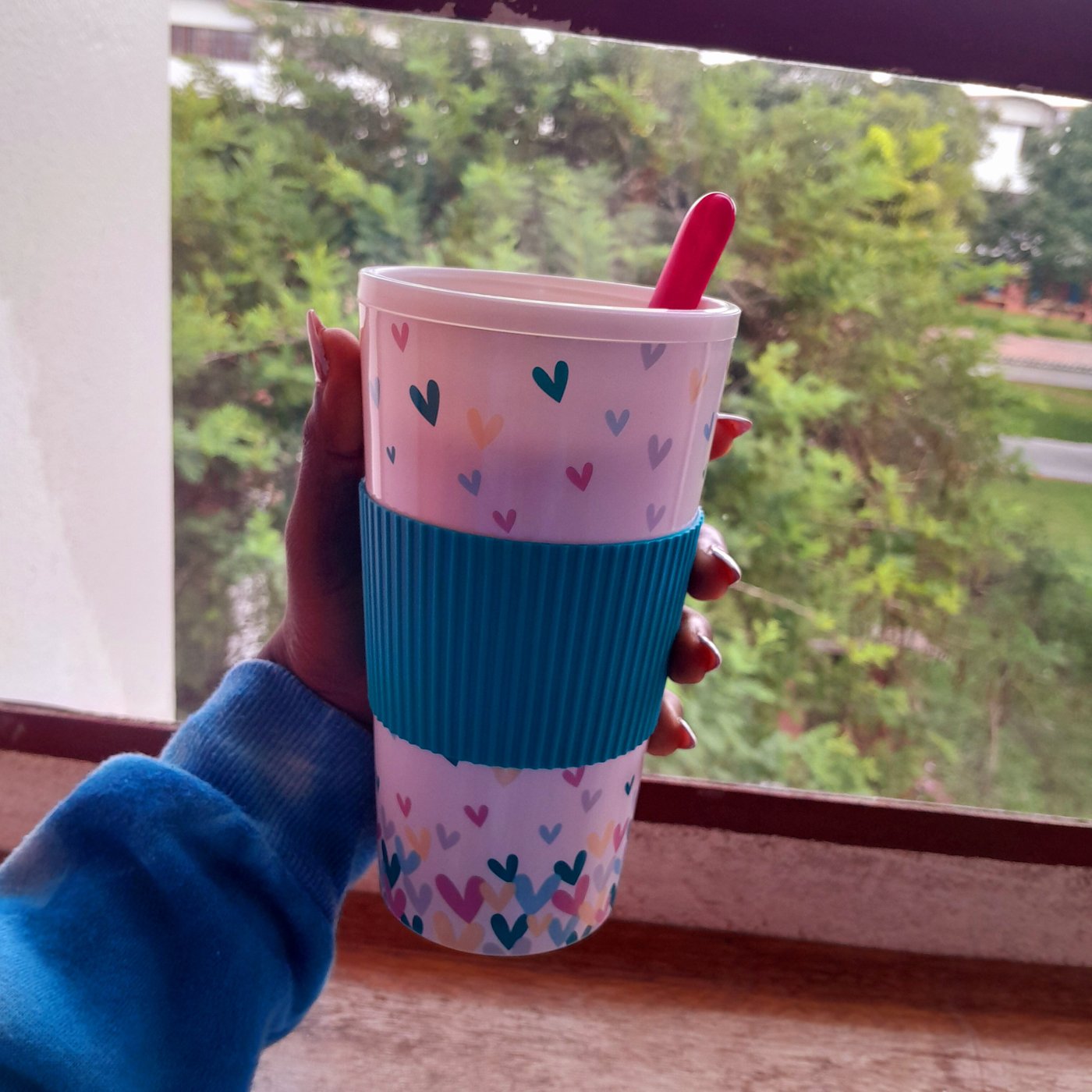
Before: the source photograph used for all three scenes. Photo: Yenzzy, CC0.
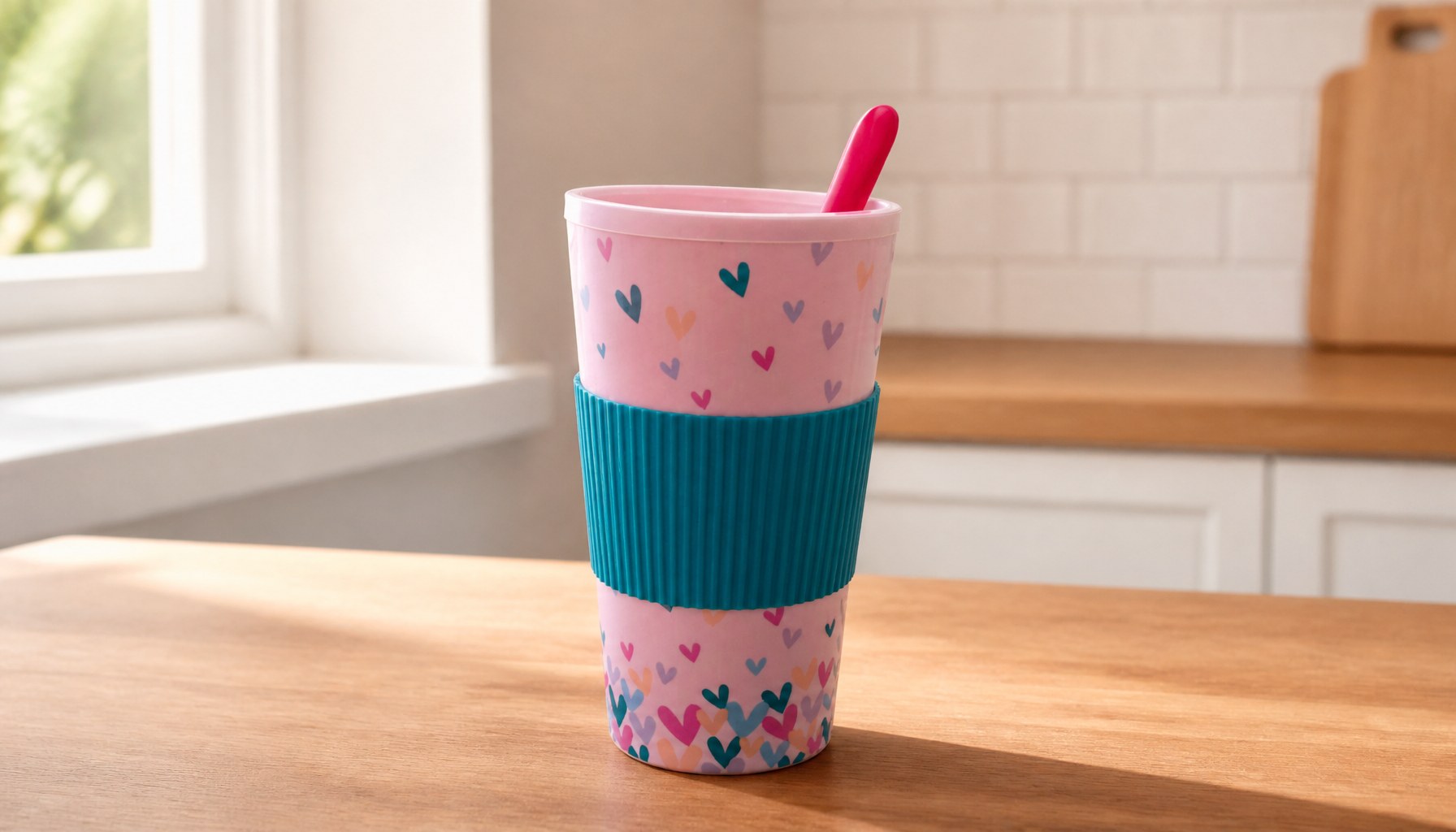
After: a kitchen counter replaces the window and hand. The recognizable design remains, but the lower heart arrangement and apparent proportions differ.
Scene 2: work desk
Before: the identical source photograph, not a new product shot. Photo: Yenzzy, CC0.
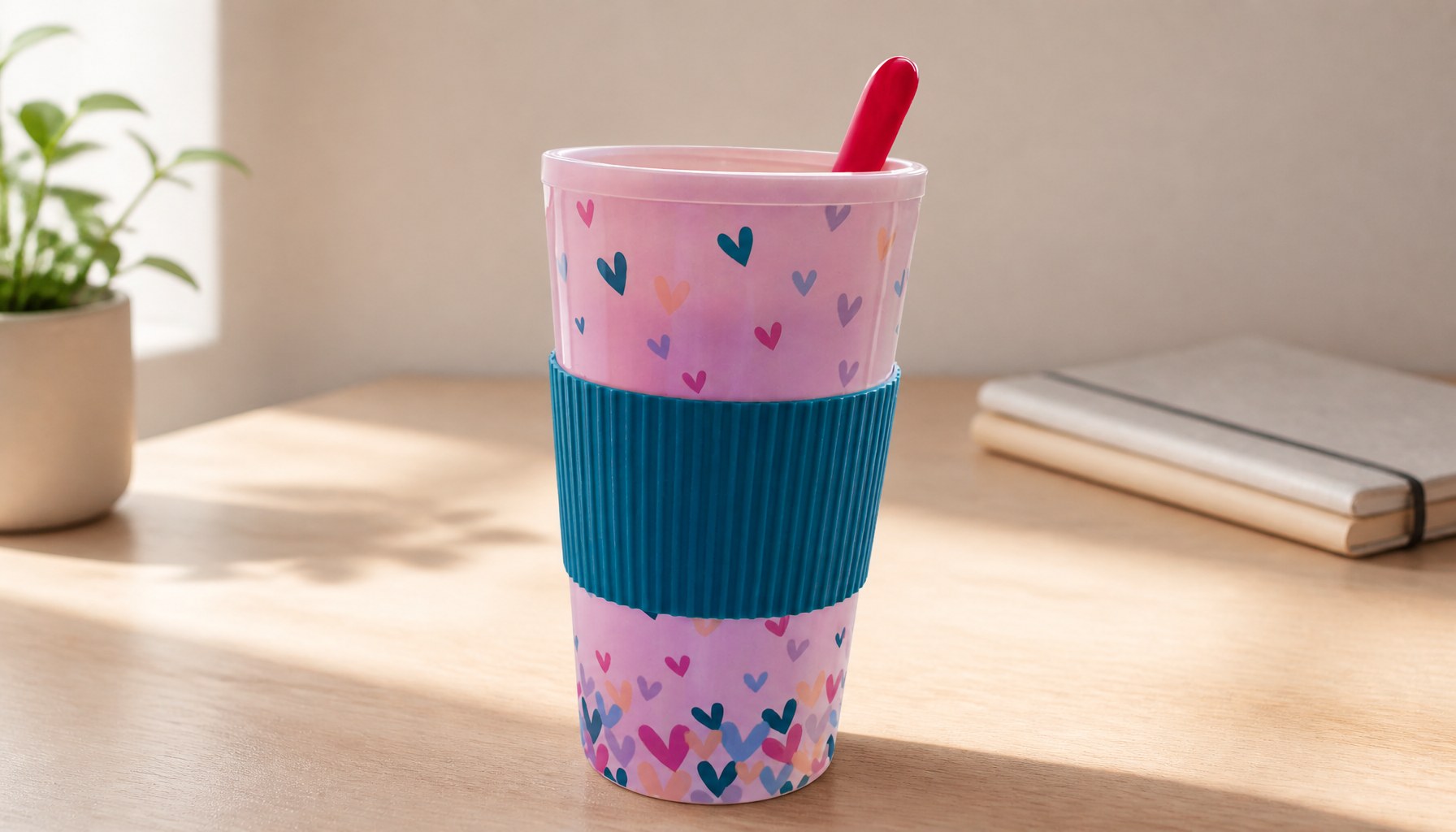
After: the mug rests on a desk beside a notebook. Small decoration details and the reconstructed lower edge need rejection under a strict preservation brief.
Scene 3: sheltered patio
Before: the same photograph supplied to the patio job. Photo: Yenzzy, CC0.
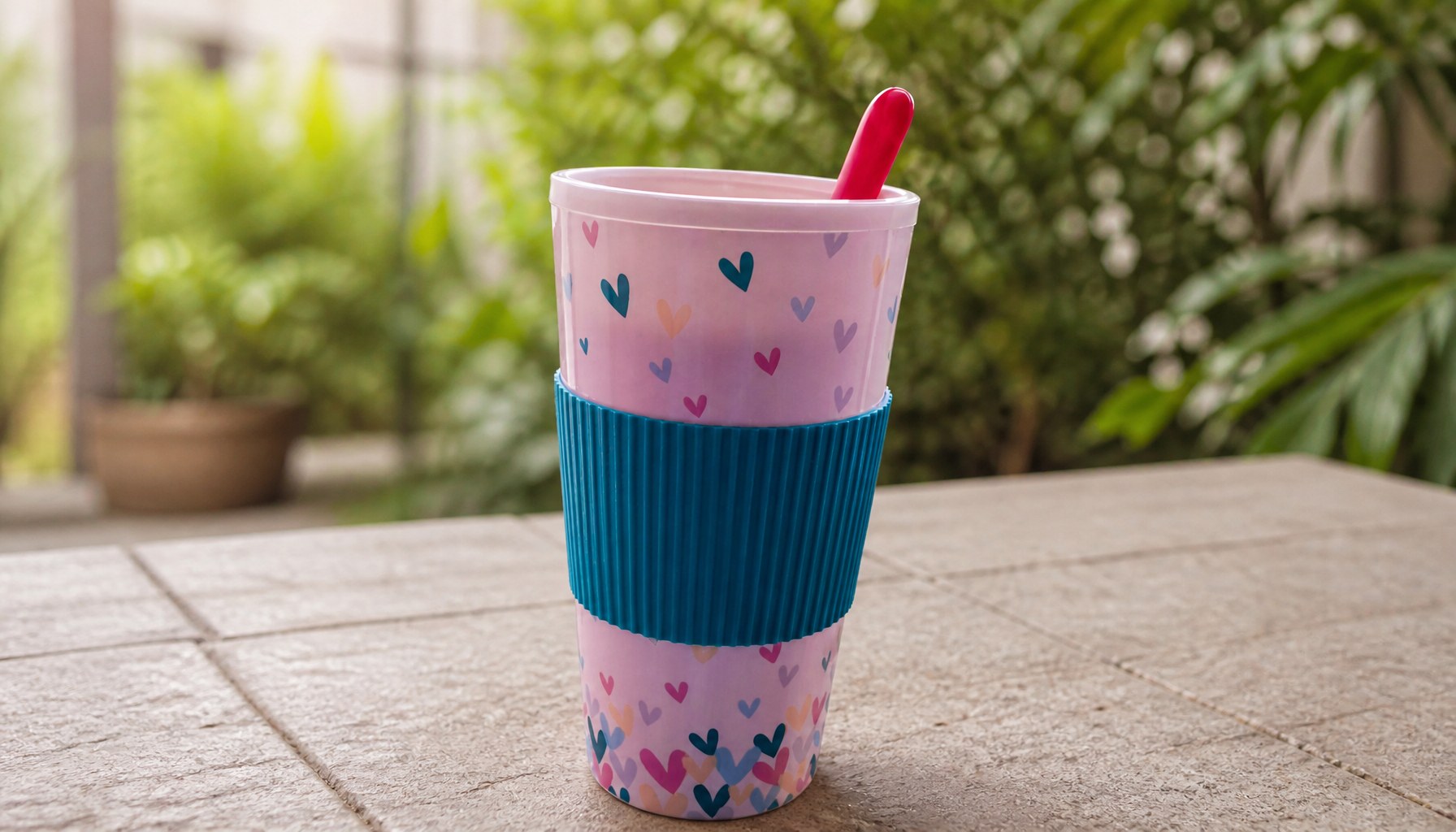
After: a patio setting creates a third composition. The heart pattern and apparent sleeve-to-body proportions do not match the source exactly.
What the three outputs demonstrate
| Scene | What worked visually | What prevented exact-product approval |
|---|---|---|
| Kitchen | Recognizable pink mug, teal sleeve and red spoon; clear tabletop contact | Lower decoration layout and apparent proportions differ |
| Desk | A distinct work setting with the main product features visible | Small hearts and reconstructed base are not a faithful copy |
| Patio | A plausible outdoor surface with the recognizable design | Pattern placement and apparent sleeve-to-body proportions differ |
These are six before/after panels made from one source and three generated outputs. No successful-looking replacement has been substituted for a failed attempt. All three are retained as evidence of the limits of full-image generation.
The requested ratio also needs checking: all three downloaded outputs measured 1,792 × 1,024 pixels, which is 7:4 rather than the requested 3:2. The displayed images retain that returned frame. A placement requiring 3:2 would need a reviewed crop or a different export.
The practical verdict is narrower than “the product stayed unchanged.” The model produced three recognizable lifestyle compositions from one real photograph; none passes a strict exact-design check. That result supports using reference generation for concepts and reserving product approval for a separate comparison.
For a store-ready revision, obtain an unobstructed photograph and composite that photographed product into a compatible scene. The protected-layer route described here was not executed in this test. It should not be presented as a demonstrated ImagineLab control or as a completed SKU proof.
Tradeoffs that matter before a store approves the images
A single source photograph constrains the believable viewpoint. That is useful when consistency matters, but it limits how dramatically the product can be restaged. More ambitious poses may call for additional source photographs.
Reflective and transparent products need particular care because their appearance includes the surrounding environment. Keeping an old reflection unchanged may make a new setting implausible; regenerating it may alter the product’s appearance. Decide whether the brief permits that change before accepting the result.
Heavy color grading can make a correct object look like another variant. Review product color under a neutral comparison as well as within the final scene. Do not use a stylized background as an excuse for a misleading finish.
For US-facing advertising, the FTC’s advertising guidance requires truthful, non-deceptive and evidence-based claims. In this workflow, a practical editorial safeguard is to check the impression created by props and setting, not only the written copy. A lifestyle scene should not stand in for evidence of a product’s performance.
The useful cost measure is the total verified cost of included attempts divided by the number of accepted outputs. If none pass, report the spend and zero accepted outputs. Avoid describing that as a successful low-cost pack.
What to show a store after it agrees to a proof
Begin with the store’s approved product photograph and protection list. Present each original/output pair, briefly explain what changed, and identify anything that still requires the store’s judgment.
Keep background styling approval separate from SKU accuracy approval. An editor can check visible differences; the store can confirm whether those differences affect the actual product. Retain the agreed source, prompts, rejected attempts and accepted exports so a revision can be reproduced.
Do not attach claims about sales uplift, conversion or campaign performance to a creative demonstration. Those outcomes require a separate campaign and measurement design. Three visually different scenes establish neither marketing success nor universal product preservation.
Make the decision from the product outward
Use a reference-guided edit when you can inspect and reject altered results. Use a protected photographed product layer when exact visible details are the priority. Request another photograph when the desired scene depends on an unseen angle, complex interaction or reflections that cannot be resolved convincingly.
For AI lifestyle product photography, the acceptance question is simple: would a customer recognize the delivered item as the one represented here? Build the scene around that answer.
Create a Lifestyle Product Photo in Image Lab using an authorized source. Confirm reference support and the EDT quote for the selected model, then judge the downloaded result against the original.